SIM bench
A page where you sign in with a 1NCE account and see every SIM on it. It reads the whole account once, and then answers every search at once, however large the account is.
It has no sign-in of its own: you sign in with the 1NCE account, and 1NCE checks it.
Use it to find a SIM — by building, by ICCID, by IMEI — and to see what it has left, when it last had a data session, and what happened to it. You can also enable a SIM, disable one, and rename one.
Why not 1NCE's own website. Its search is slow, and how slow changes from one search to the next: seven searches over the same rows took from a quarter of a second to eight seconds, on a day its owner called fast. Here the account is read once, and every search after that is answered from what was read.
It holds no account of its own. Without a 1NCE account, you see no SIM.
Words used on this page
- An account is one 1NCE customer: a user name and a password. A company that buys its own SIMs has one of its own.
- The organisation is the number at the start of an account's name, before
the
_. - The list is every SIM on the account, as 1NCE described it when it was read.
Signing in
| Field | What to write |
|---|---|
| Account | An API account, in the form 00000000_name. The account you use on 1NCE's web site is not one of these. |
| Password | That account's password. |
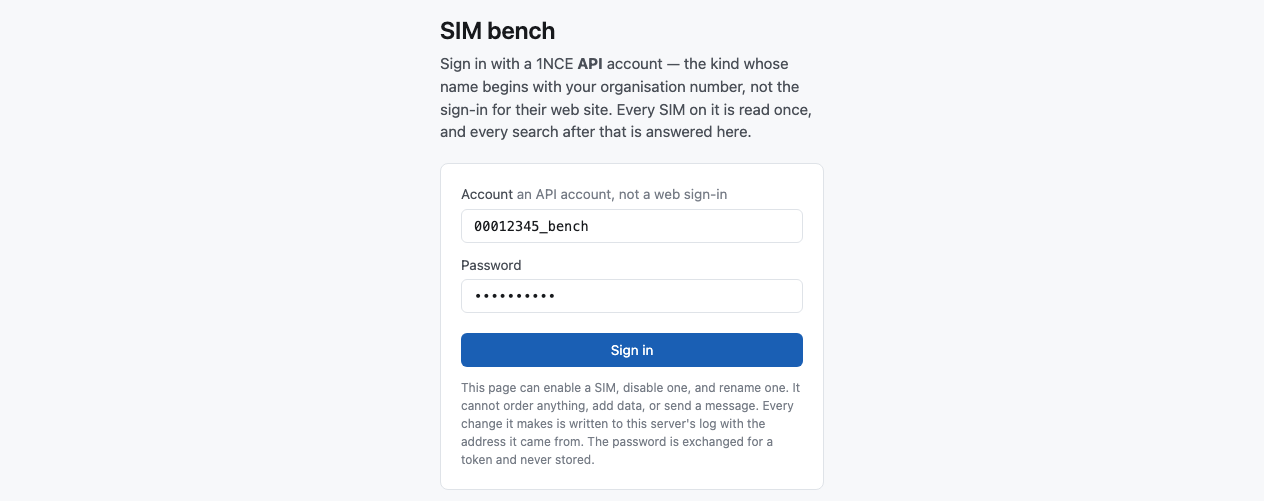
Then press Sign in. The button says Reading the account… while the list is read. That takes a second when 1NCE is well, and up to half a minute when it is slow. After eight seconds the button says so.
The password is used once. It is exchanged for a token from 1NCE, and then it is gone. It is never stored.
If the sign-in is refused, the page says why:
| The page says | What it means |
|---|---|
| 1NCE refused that account name and password. | A wrong name or password. The page says the same for every refusal, so nobody can use it to test whether an account exists. |
| 1NCE accepted that name and password but will not let it read SIMs. | The account is real, but it is not an API account with access to SIM management. |
| 1NCE did not answer when asked for this account's SIMs. | 1NCE is slow or down. Try again shortly. |
| Too many people are using this service. | Try again shortly. |
How long you stay signed in. The session works in every tab of the same browser, so you can open a SIM in a new tab. It ends after 30 minutes unused, after four hours in any case, and when 1NCE's own token expires. Then the page shows the sign-in form again, with That session has ended. Sign in again. above it. Sign out ends it at once.
The list
At the top: how many SIMs are On this account, how many are Shown, and when the list was Read at.
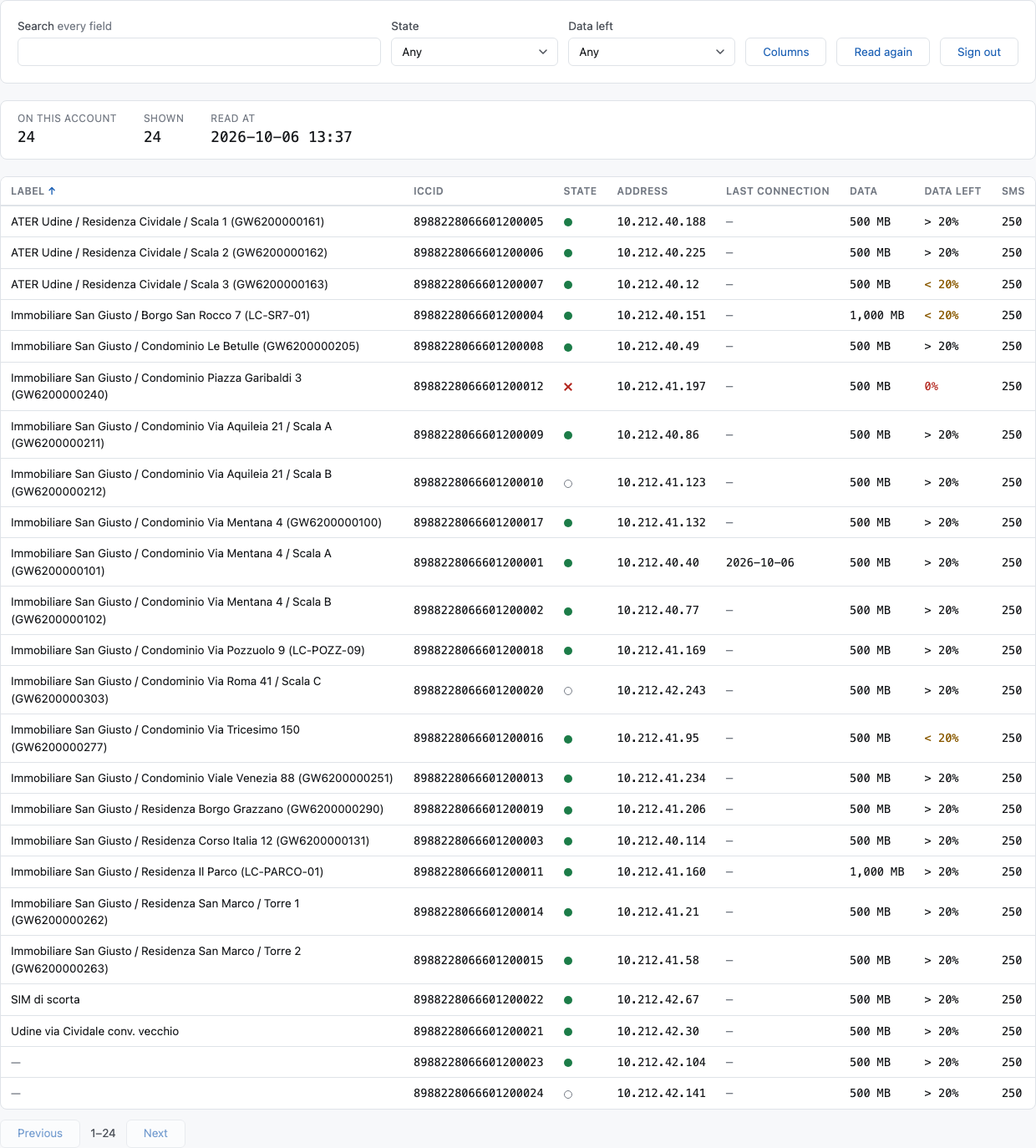
| Column | What it says |
|---|---|
| Label | The SIM's name on 1NCE. Usually it is the building. Click it to open the SIM. |
| ICCID | The number printed on the SIM. |
| State | A mark: a green dot is enabled, a grey ring is disabled, and a red cross is suspended — stopped by 1NCE. Move the pointer over the mark to read the word. |
| Address | The SIM's IP address. |
| Last connection | The day the SIM's last data session ended. Move the pointer over it to read the time. It comes from the data stream, so it is empty for a SIM the stream has sent nothing for. |
| Data, Data left | The data allowance in MB, and how much is left: > 20%, < 20% or 0%. |
| SMS, SMS left | The same for messages. |
After these come any other fields 1NCE sends, under 1NCE's own names.
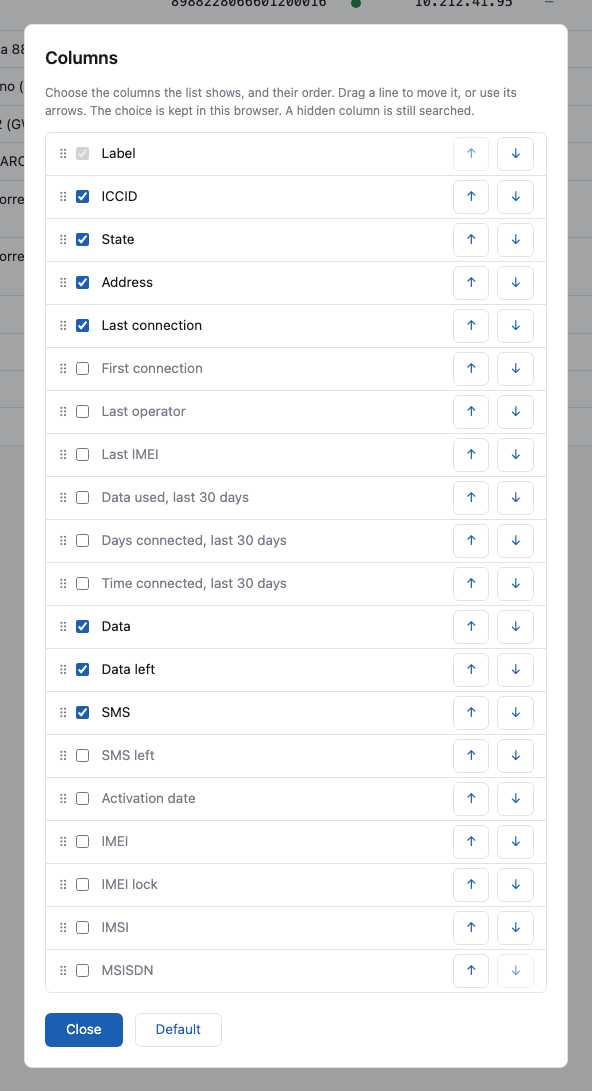
Some columns are hidden to keep the list narrow. Press Columns to show them. The fields of 1NCE are still searched when hidden, and they are shown on the SIM's own page.
| Hidden column | What it says |
|---|---|
| SMS left, Activation date, IMEI, IMEI lock, IMSI, MSISDN | Fields 1NCE sends. |
| First connection | The day the SIM's first recorded data session started. |
| Last operator | The network of the SIM's last data session, and its country. |
| Last IMEI | The modem that made the SIM's last data session. If it differs from IMEI, the SIM is now in another modem. |
| Data used | The data used in the last 30 days, in MB. |
| Days connected | On how many of the last 30 days the SIM had a data session. |
| Time connected | The total time of the data sessions of the last 30 days. |
The last six come from the data stream, like Last connection. They show a dash for a SIM the stream has sent nothing for. A zero means the stream knows the SIM and it had no data session in the last 30 days.
To choose the columns, press Columns. Tick a column to show it and clear the tick to hide it. Drag a line to move its column, or use the two arrows to move it earlier or later. The dialog names the three columns that are over the last 30 days in full, for example Data used, last 30 days. Default brings back the usual columns. The choice is kept in your browser, so it is the same the next time you sign in on this computer. The label is always shown.
To find a SIM, type in Search. It matches part of any field, hidden ones included, and ignores upper and lower case. Two choices narrow the list further:
- State: any state found on the account.
- Data left: Less than 20%, which includes the SIMs with nothing left, or Quota exceeded alone.
Click a column's heading to sort by it, and again to reverse. Empty values always sort last, and numbers sort by size. The list shows 50 SIMs at a time, with Previous and Next.
Read again reads the whole account from 1NCE again. Do it after a change made somewhere else, on 1NCE's website or by another program. If the new read fails, the old list stays on screen, and the page says so.
One SIM
Click a label to open the SIM. Hold Ctrl or Cmd, or use the middle button, to open it in a new tab. Back to the list, or the browser's own Back button, returns to the list as you left it.
A SIM's page has its own address: the bench's address followed by the ICCID. You can bookmark it or send it to a colleague. A link names a SIM but does not give access to it: whoever opens it must sign in with an account that holds that SIM. If the SIM is not on your account, you stay signed in: the page shows the list and says That SIM is not on this account.
The page appears at once, with what the list already knows, and fills as 1NCE answers. Opening a SIM asks 1NCE about it again, so its page is current even when the list was read hours ago. A value still being asked for says reading…. A value 1NCE did not send is a dash.
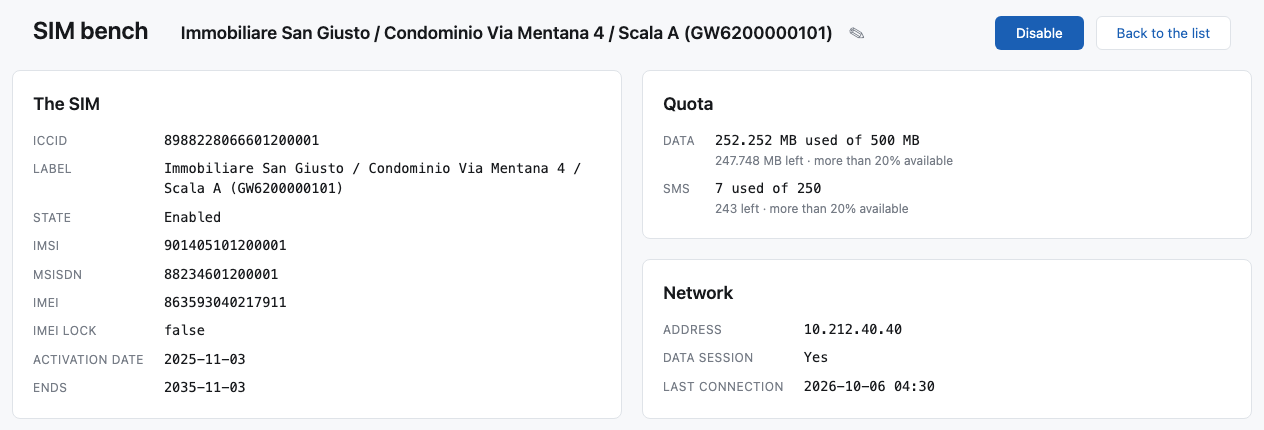
- The SIM: every field 1NCE sends, including the four the list hides, and Ends, the date the plan ends.
- Quota: for example 6,096.263 MB used of 9,000 MB and 2,903.737 MB left · more than 20% available. The second half is 1NCE's own sentence, so the two can be compared. The total grows with each top-up. A SIM can use more than its total, and the page shows that as it is.
- Network: its address, whether it has a data session now, and when its last data session ended.
- History: what 1NCE recorded about the SIM, newest first.
Traffic and statistics
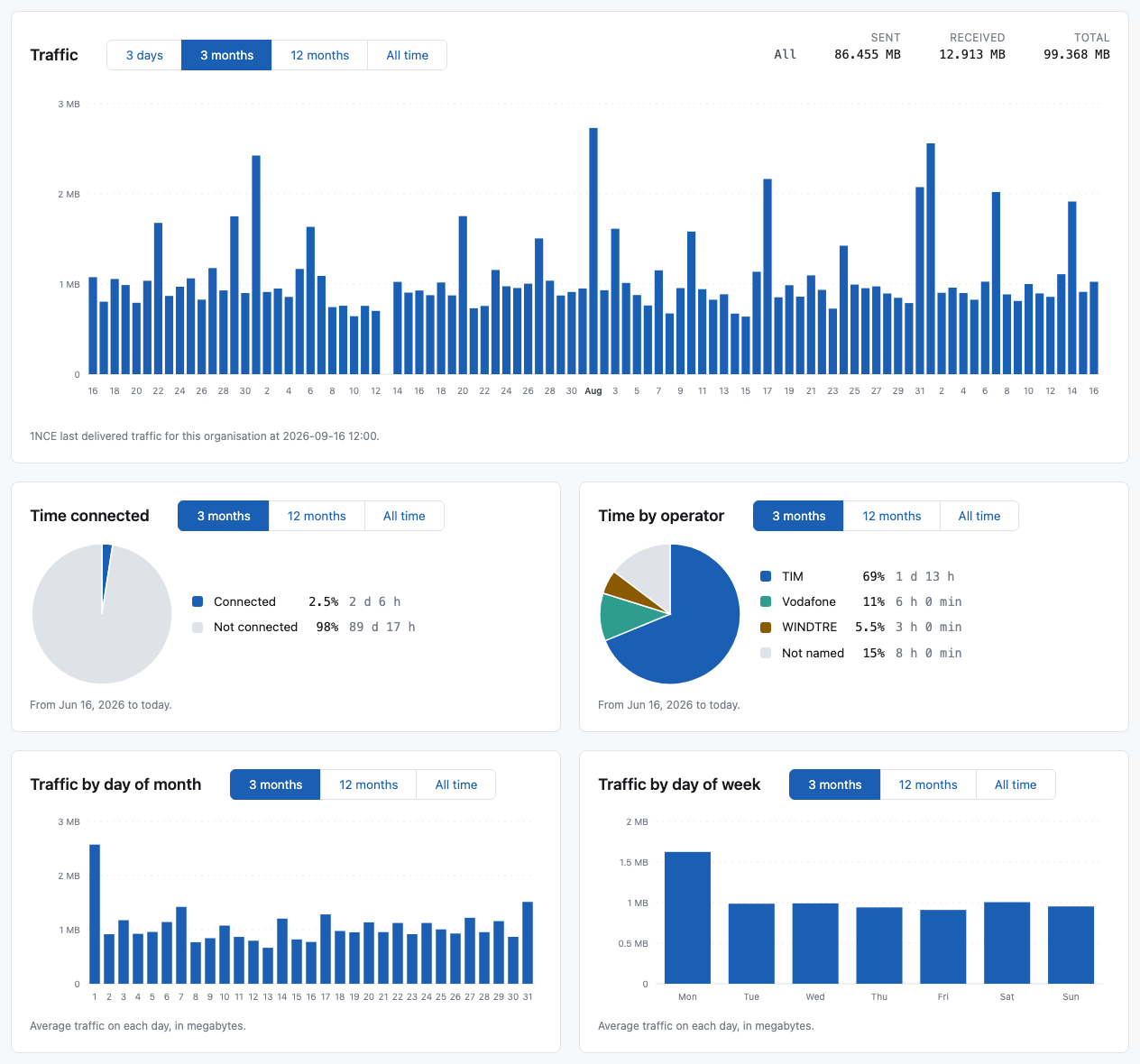
Traffic is a chart of the data the SIM sent and received. Choose the period: 3 days (one bar for each hour), 3 months (one bar for each day), 12 months (one bar for each week, from Monday) or All time (one bar for each month, from the SIM's first session). The row above it gives the totals, and the bar under the pointer.
Under it are four cards. Each one has its own period: 3 months, 12 months or All time.
- Time connected: how much of the period the SIM had a data session. An always-on gateway is near 100%. A level converter read for a few minutes a day is well under 1%.
- Time by operator: which mobile networks the SIM used, as a share of the time connected.
- Traffic by day of month and Traffic by day of week: the average day, so you can see when the SIM is used.
Quota forecast draws what was left on each day of the last six months, then a straight line at the average rate, carried on until the data would be spent. The sentence under it gives the date. The forecast needs at least three months of traffic on record, and it cannot know about a future top-up. When the plan ends before the data runs out, the sentence says that the plan's end comes first.
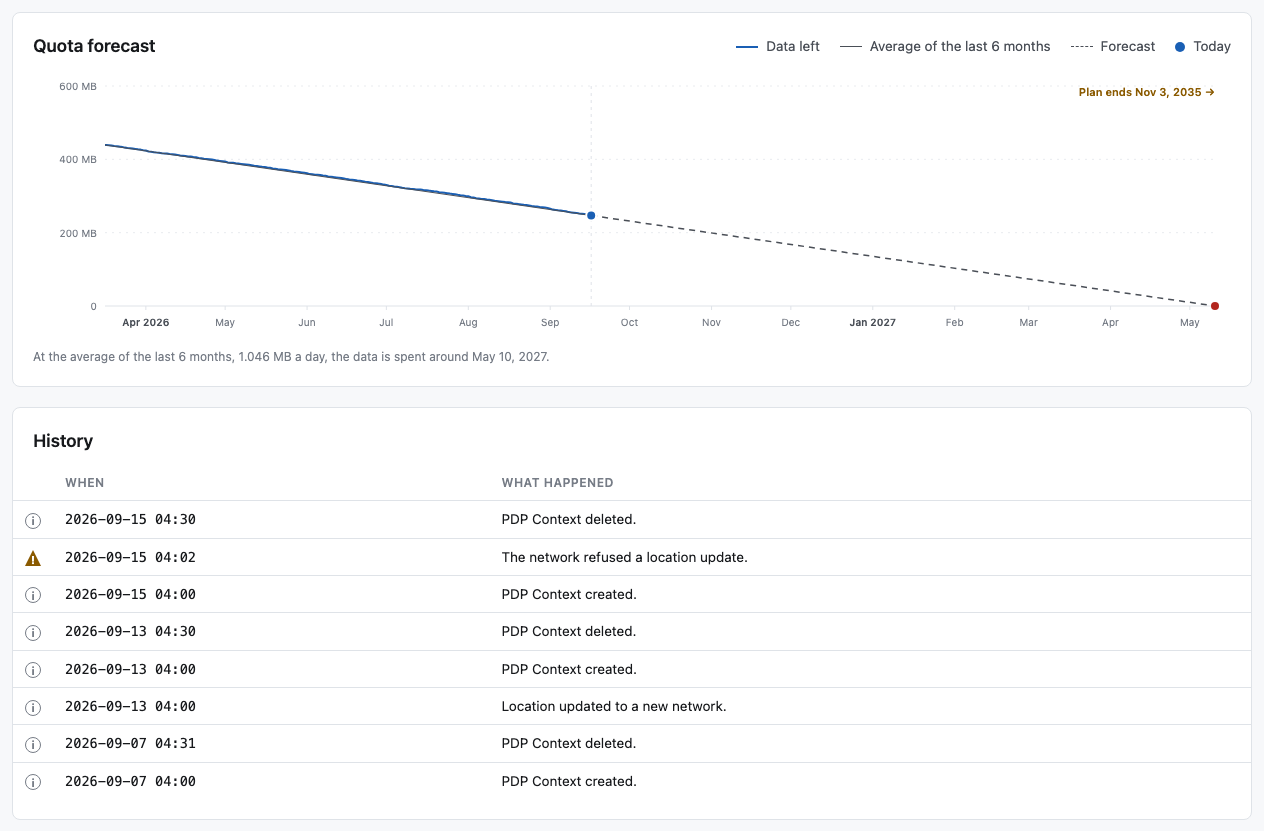
All of these come from 1NCE's data stream, not from the list: 1NCE sends each data session to the bench as it happens, and the bench keeps them. So a SIM with no traffic on record has no statistics, and the page says so. It does not say 0% connected. A line under the chart says when 1NCE last delivered traffic for the organisation.
Starting an organisation's data stream
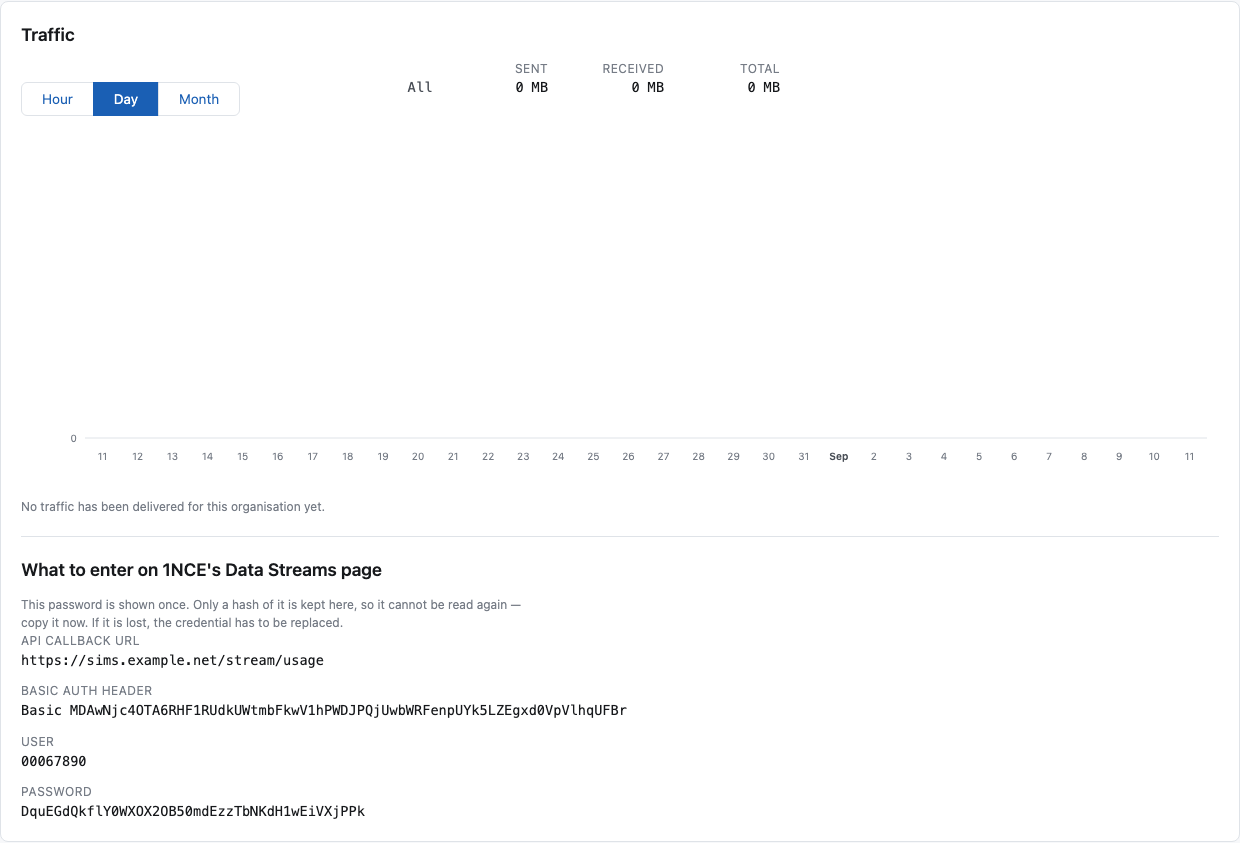
The organisation of whoever runs this bench already has its data stream. For any other organisation, the chart stays empty until somebody tells 1NCE where to send the traffic. The page says so under the chart and offers Create a credential.
-
Press Create a credential. The page shows four values: API callback URL, Basic auth header, User and Password.
-
Copy them now. The password is shown once: the bench keeps only a hash of it.
-
On 1NCE's website, open the Data Streams page, and enter the callback URL and the credential there.
A second credential for the same organisation is refused, because it would make the first one stop working. If the password is lost, ask whoever runs this bench to remove the old one.
Changing a SIM
The bench can change two things on a SIM: its state and its label. It cannot order anything, add data, reset a connection or send a message.
Every change is written to the server's log, with the address it came from. With no sign-in of its own, that line is the only record of who changed a SIM.
Enable and disable
The button beside the SIM's name says Enable or Disable.
- Disable asks first, and names the SIM: Disable the SIM for …? Its building cannot be read until it is enabled again. A disabled SIM stops the gateway or converter behind it, and nothing else on this page will remind you of it.
- Enable does not ask. It costs data and can be undone here. 1NCE takes ten to fifteen seconds to give an enabled SIM a data session.
Rename
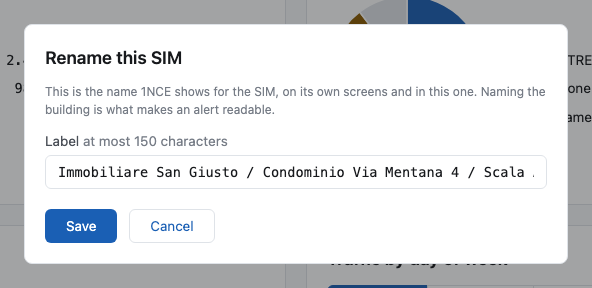
The pencil beside the name opens Rename this SIM. Write the new Label and press Save. A label has at most 150 characters, and cannot be empty. Renaming changes the label only: the state and the IMEI lock stay as they were.
What the page says after a change
After a change, the bench reads the SIM back from 1NCE, and tells you what 1NCE says now — for example 1NCE has this SIM as enabled. 1NCE accepts a change before it applies it: a disable shows in a few seconds, an enable in ten to fifteen. So the page may say 1NCE accepted the change and has not applied it yet. Open this SIM again in a few seconds. That is normal.
If 1NCE refuses, the page says 1NCE did not accept that change. Nothing was altered.
What 1NCE says back goes into the list too, so the list agrees with the SIM's page without a Read again.
Limits
| Sessions on the bench at once | 24 |
| Sessions from one address | 4 |
| A session nobody uses | ends after 30 minutes |
| Any session | ends after 4 hours, or when 1NCE's token expires |
| SIMs on one account | up to 10,000 |
| A label | 150 characters |
The bench asks 1NCE for at most five pages of the list at a time. 1NCE refuses more than that at once, and a page it refuses is asked for again.
Why there is no sign-in
1NCE checks the account, so without its password you see nothing. A password on the bench as well would be a second secret, and it would say nothing about who may read which account.
The bench is careful with what it is given. The password is never stored and never written to a log. What is logged is that a session opened and from where, and every change made to a SIM.